Committee Meeting 26-Feb-2026 Technology Report
Report on Technology for the Committee Meeting on 26th February 2026 by Kevin Machin
Contents
A summary of the progress made since the 10th January 2026 report, along with plans for the next steps.
There's also a report about the poor state of the membership data. My aim with this is to highlight problems that need fixing, moving forward, rather than to dwell on the past and how the situation came about.
Achievements
Existing Website
Improvements have been made to the writing groups directory page. It's now easier to maintain, though not yet fully automated as planned for the future.
Points to note…
- There is now a single directory, rather than a separate one for each geographical region, though the groups are still listed under their regions.
- This also applies to the detailed directory as a downloadable document, i.e. there's only one of them now.
- Both the group names listing on the web page and the document are now generated from a single source of truth, so there's (almost) only one thing to edit when the directory needs updating.
- Important note: this is still decoupled from the membership data, so for now we'll need to be careful to manually keep the changes synchronised.
New Website ↑
Progress on the new website proceeds towards a Minimum Viable Product. In particular:
-
The ability for members to log in with the single password, in order to access the restricted areas, is nearing completion.
Please note that, unlike the Ionos website, this amounts to much more than a single page (or perhaps two), giving us much more flexibility and avoiding the need to overload any page.
-
Development for the use of online forms is well underway, which includes:
- Applications for membership & renewals.
- Entries for competitions.
- Booking for events.
- The contact us form.
These might initially be tricky, due to teething issues with automated emails, but we can always fall back on downloadable forms.
Automatically Generated Directory ↑
A tool has been developed, that takes the membership data and uses it to automatically generate the group directory details. This includes the following.
- Sorting the groups into regions, using the postcodes information.
- Examining the "display" flags in the membership data, in order to determine what information may go into the directory, and what cannot due to consent not being given.
- Generating the markup for the website.
- Generating the single PDF document with the detailed directory information.
The tool is mostly finished but, to be honest, the system is not fit for use. This is because the underlying data are in a very poor condition. More about this is explained in the data integrity section in this report.
Analysis and Problems ↑
Working on the writing groups directory has led to:
- A long look at the way we're recording and manipulating membership data,
- The realisation that these data are in poor condition.
Membership Data Analysis ↑
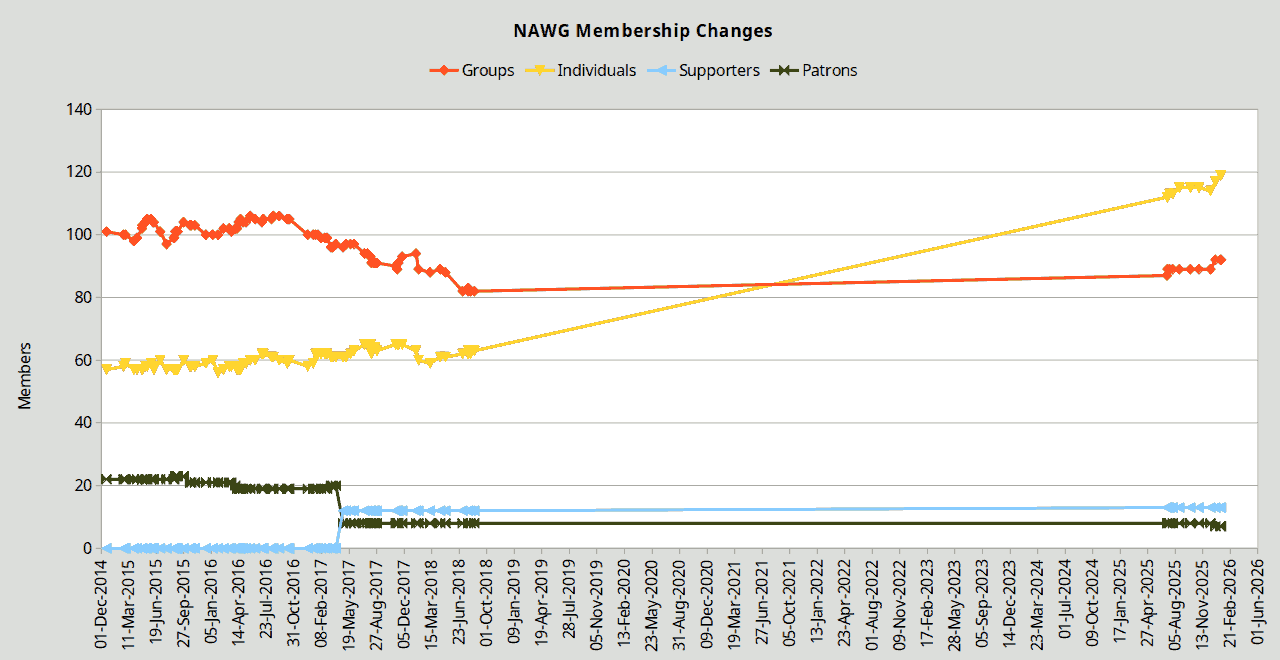
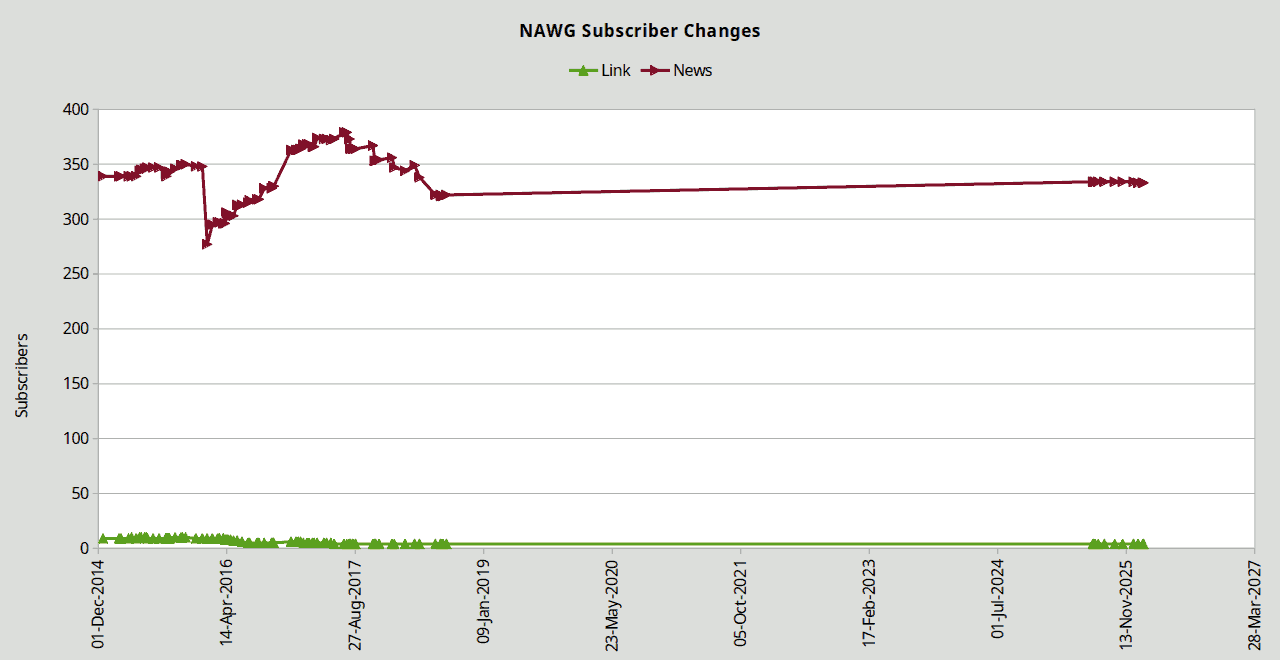
Using historical data, an analysis of the NAWG membership was done. This was to look at the trends from around the start of 2015 to the present day. The key findings are as follows.
- Up until around the end of January 2016, individual members were known as associates.
- Around the end of April 2017, the patrons were split into two types: patrons and supporters. I'm unclear as to the distinction between the two.
-
Between around August 2018 and July 2025, there are no data (at least not available to me). During that period and to the present day:
- The number of groups has remained between 80 and 100. Any discrepancies between these figures and recent membership reports, which put the groups at around 40, may be due to data integrity issues. More on that later; see below. It may also be due to the fact that there may be many groups in the database, but who haven't paid their fees.
- The number of individual members has approximately doubled from around 60 to 120. Again, there may be disagreement on these figures.
- The number of subscribers (mostly receivers of the newsletter) has remained approximately the same, at around 320—330.
The following charts show the trends.
Membership Data Integrity Issues ↑
As mentioned in the last section, over the past few weeks, I've been looking at the membership data. The driving reason behind this is to make it easier to keep the writing groups directory area on the website up to date. As I've said in various messages, this was previously a very labour intensive task.
Work on this goal is progressing well, but along the way I've found some significant issues with the Excel workbook that we use to maintain our membership information.
-
Hidden rows: Some rows, on several sheets, are hidden. This is a feature of Excel, but not everyone may be aware of it, unless the row numbers sequences are carefully examined.
The hidden rows are sometimes due to the use of filters (see below), but not in every case. Some sheets have hidden rows with no filters active.
This is a serious issue, as it essentially means there are data present that we simply may be unaware of.
-
Data hidden by filters: The documents are often saved with filters still active. This is bad practise, as less experienced users may be unaware that data are hidden.
Filters are useful while working on the document, but should be cleared before saving and uploading to Dropbox.
-
Data integrity problems: The quality and integrity of the data in the workbook has degraded over time.
The issues include, but are probably not limited to, the following (in no particular order, but enumerated for reference).
- Duplication: Some sheets have duplicated information in them, e.g. "ExMembers" and "Removed - full details". This is a recipe for errors and inconsistencies.
-
Schema: There's been copying and pasting all over the shop, by the looks of things. In particular…
- Data have been copied from one sheet to another, but this synchronisation has not been maintained.
- Some sheets have duplicate columns, e.g. with the same name and the same data repeated. Again, this is inviting errors and inconsistencies.
-
The "Directory Data" sheet is woefully out of date and out of sync with the "CurrentNames" one. It's clearly been copied at some stage, but not properly maintained.
Many of the columns are repeated across the sheets, but there are far fewer group entries in the directory one. Plus the identifier numbers don't match up at all.
The sole purpose of the "Directory Data" sheet seems to be to add columns to the main data but filter out everything except groups. There are much better ways to to this than rely on manual copying. The obvious thing to do to solve this is to move the extra columns back into the main sheet, so there will be no duplication of the primary set of columns.
No data should be duplicated anywhere; there should be a single source of truth, from which everything is derived. That way, if the source data are changed, then this will properly propagate without anyone having to remember to manually synchronise anything.
- Bad postcodes: UK postcodes have a very specific format, but quite a few of them are invalid. This can lead to problems with communication, but also in deriving groups' regional areas.
- Incorrectly placed data: Some information is in the wrong cell (row and/or column). Some cells contain their intended data, but with extra information "leaked" from other cells.
-
Incorrect data in the Type column: This column is highly important, as it's used to determine what kind of membership the row pertains to.
It should only contain the values: enews, Link, Group, Indv, Patron, Supp. I'm not overly concerned about mixed casings, but misspelled versions are a problem, as are values polluted with other junk.
There should also be no blank cells in this column. By "blank" I mean empty, or containing only spaces. On the subject of spaces, there are cells (not just in the Type column) that have their data prefixed and/or suffixed with extra padding spaces, probably pasting errors, which stop the filters and sorting features from working properly.
-
Patrons: Some patrons are deceased, or may have stopped being patrons for other reasons, yet they're still marked as active in the data.
I'm also unclear as to what the difference between a patron and a supporter is.
-
General:
- Some people are down as both current names and as ex-members.
- We seem to allow more than one contact person per group, one or more of which may or may not be the "financial contact". There's nothing inherently wrong with this but, without a proper explanation to new committee members, these kind of data relationships are not at all obvious.
-
Useless extra sheets: "Sheet1" is empty. "Sheet2" has irrelevant data: a list of food types.
These are just clutter, distracting, and a waste of space and bandwidth.
-
No documentation: There are no instructions in the workbook for how to properly use it, except for some rather cryptic hints in some of the column headings. No documentation in the Dropbox either.
In particular:
- No explanation of the data schema, i.e. how the relations are meant to work.
- No explanation of the correct procedures, neither for working on the document, nor on how to manage the data in the Dropbox. I suspect data could easily be lost if more than one person attempts to make changes without coordination.
- All sorts of colour coding for cells, rows, columns, with no explanation as to what any of that signifies.
I propose to clean up the workbook, and perhaps change some of the more awkward ways we store and work with the data, but this is a matter for discussion at the committee meeting.
We should probably also discuss how to go about agreeing on and documenting the procedures.
Next Steps ↑
- Clean up the membership workbook, if the committee agrees.
- Continue work on the writing groups directory tool.
- Continue work on the new website.
- Continue research into replacement technology for the shop.